Saturday, 19 September 2026

Harry Winser.com

Musings on tech, photography, and culture

Exception Handling in Java

Lets talk exception handling

Today i want to talk about exception handling in Java. I know a lot of folks have shared about this in the past, but I screw it here’s one more voice. This blog won’t be about if I think they’re good or bad in Java (it’s a complex subject, and ultimately they aren’t going anywhere), but instead how and where i think they should be used.

A refresher

For a quick refresher lets go over the two main types of exceptions in Java:

  • Checked exceptions - any exception that must be caught or declared to be caught.
  • Unchecked exceptions - any exception that doesn’t need to be caught or declared to be caught.

An example of a checked exception:

public void exampleMethod () throws ExampleChecked {
    throw new ExampleChecked();
}

public void exampleMethod () {
	try {
		throw new ExampleChecked();
	}catch(ExampleChecked ex) {
		// Handle exception here
	}
}

An example of an unchecked exception:

public void exampleMethod () {
    throw new ExampleRuntime();
}

Cool, all on the same page. Now lets go into where and how I’d use them.

Checked exceptions

Checked exceptions are both excellent and an absolute pain in the arse.

I use checked exceptions when writing libraries, as a libraries API should be explicit and self documenting. As developers we should avoid surprising users with unexpected side effects. Of course, you should also properly document your library with Java Docs and Wikis, but there’s nothing quite like saying “Hey, this method you’re going to use? It could explode with this and you must handle it”.

To complement this, I avoid unchecked exceptions. I aim to wrap these, and re-throw them as a checked one. This way I can control the messaging and the stack trace to ensure the best language and structure. Remember: Your exceptions are part of your API.

Also I don’t let generic Java ones escape without some level of catch and re-throw. It’s a pain trying to understand where a NullPointerException came when it’s not been wrapped in a something specific to the library that’s imported.

On the flip side, I avoid putting these into my application code unless absolutely required / desired. There are two main reasons:

  1. I’ll have to code every method to bubble up the exception to a root exception handler. Very messy.
  2. Java Optionals and Streams don’t work overly well with Checked Exceptions (though, unchecked exceptions are still pretty ugly but I don’t have to code around them).

More on these below.

Unchecked exceptions

I’d argue these are, on the whole, more useful and less annoying than checked exceptions. They allow a developer (me) to be lazy in both the best and worst ways.

I spend a lot of my time in Spring Boot / web applications. So I use generic error handlers that look out for extensions of the RuntimeException class. So if one is throw, a 500 internal server error is automatically returned. Or if a UserNotFoundException is throw, then a 404 is returned. And so on.

This makes the applications I write to be a little easier to follow / have a generic safety net. It also means every method doesn’t have a load of declared exceptions because some item of code throws one 7 methods deep. This is kinda what I mean when it allows me to be lazy. That generic handler does a lot of the leg work.

So I avoid checked exceptions in my application code.

However, there is a bad way to be lazy here; I can throw them for everything. I’ve seen in a number of places where a devs catch a RuntimeException and then do something else. When I was younger, I certainly did this. However, this is expensive and a lot of additional lines for very little gain.

Here’s an example where getUser throws a UserNotFoundException when no user is found:

public User getUser () {
    try {
        return getUser(userId);
    } catch(UserNotFoundException ex) {
        return performUserSetup();
    }
}

In cases like this I would instead use Optionals, and a mix of or, orElseGet and so on. This makes for much cleaner code. More efficient code. And no need for any exceptions at all.

public User getUser () {
	this.findUser("someUserId")
			.or(() -> performUserSetup())
	        .orElseThrow(RuntimeException::new);
}

On a random side note; whenever I write methods that return an Optional, I tend to use find or something like that.

TL;DR

So, in summary here’s my approach:

Use checked exceptions in libraries as code should self document and shouldn’t surprise a developer.

Use unchecked exceptions in application code to avoid writing methods with huge signatures to leverage root exception handlers, and leverage Optional where possible

Happy programming!


It's been a while

On where I've been...

Wow it’s been a while!

So, where have I been? Well, I proposed to my partner in Rome, and they said yes! Honestly I’m an incredibly lucky guy.

I’ve been working a lot too. Gotta grease the wheels of capitalism. Oh and of course I’ve been riding the Guzzie a lot. Stunning weather this year! I’ve also been playing a lot of music - even had a slot at the Totnes show! So was pretty cool.

A street in Rome
A cobbled street in Rome, with lights hanging above
(Taken on an iPhone 16, and then messed with using Snapseed)

But now the cold weather is closing in I’ve got more time to write again. Can no longer ignore the desire to write with a quick sea / river swim!

In between enjoying the sun and my job I’ve been working really hard on a technical side hustle that I’ll share soon. Basically, if I’ve been at my desk I’ve been writing code for my job, or for my side thing. And when it’s sunny, I really don’t want to be at my desk.

With the weather changing, I’d like to get back into my original “promise” to blog once a month. And I’ve got a load of blog ideas. Too many. Bound to be one good one in there somewhere.

My first blog (except for this one) will probably be a three parter. I want to do a deep dive into the Apple ecosystem from the perspective of someone new to it all. And oh boy do i have opinions! I’m aiming to break it down across hardware, software, and then finally ecosystem & culture.

Trees on a mound
Two trees on a mound, with their roots spreading out around them
(Again an iPhone 16, using Project Indigo)

Anyway, it’s nice to be back. Bring on the blogging!


GeoTools - a simple geospatial tool

A simple geospatial tool to view, create, and edit geospatial shapes

Geospatial tech is a deep, rich, and complex sector of the tech industry. I work for a small startup, Edozo, which handles Commercial Property Data and Mapping. What this essentially means is that for the past 5 years I’ve been working within the GeoSpatial sphere, using things like PostGIS and GeoServer to deliver products.

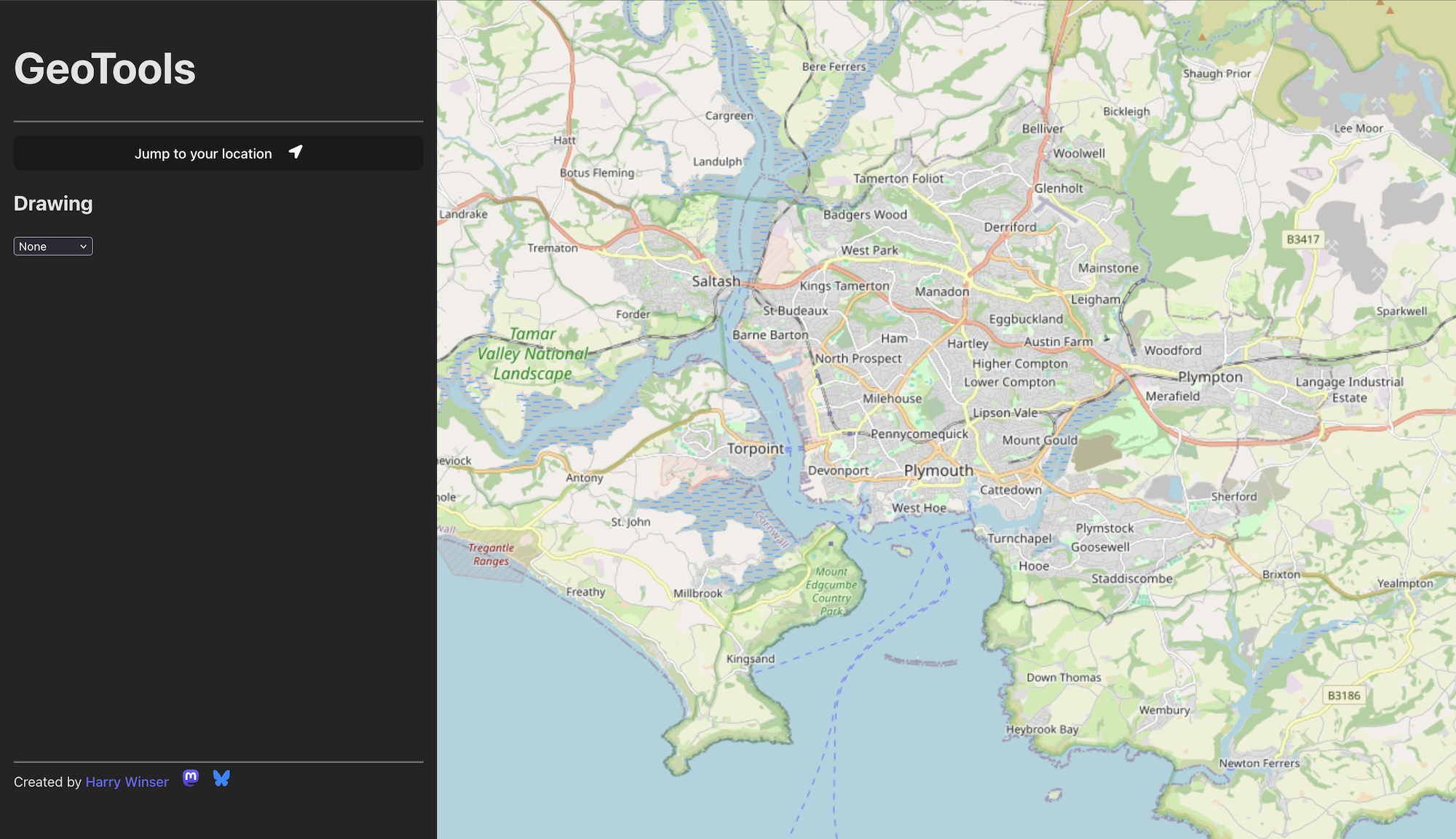
I’ve learned a whole lot on this journey (and will probably be the subject of a number of blog posts in the future) but today I want to share a little side project I’ve been working on: geo.harrywinser.com.

A screenshot of the early build of geotools

The problem

On a day to day basis, I tend to work with a lot of different geometries; user inputted, or derived from user interaction. I also need to generate geometric test data, such as for unit tests or testing API endpoints.

With that in mind, I soon discovered a bit of an issue with the tools I was using, and I couldn’t find anything quite what I was looking for.

For example to convert a GeoJSON Feature to a different SRID I’d do:

  1. Extract the Geometry from it
  2. Read it in Postgres using ST_GeomFromGeoJSON
  3. Set the SRID
  4. Convert to a new SRID using ST_TRANSFORM
  5. Convert back to GeoJSON

As you can see, this is quite a long and involved process. If the shape is large, DBeaver can start to crash. And if it’s a FeatureCollection, well then that’s extra hard.

With all this in mind, I thought “There has to be an easier way to do what I need doing!”.

So I went hunting on the net.

One of my first finds was geojson.io. It’s a good looking site, and very focused on creating and editing GeoJSON. However, I found the tools tricky and unintuitive (to me), and it cannot transform the shapes between different SRID’s * .

There is also QGIS which is a fantastic Desktop application for doing all sorts of GeoSpatial data manipulation. It can easily do what I need. However it’s not lightweight, has a many GB install, and uses a lot of RAM while in use. Not great if you just need to draw a shape and copy out some GeoJSON.

A Solution

So, I thought about it, and made a list of what I needed to get the job done:

  1. Create/Edit shapes
  2. Insert Shapes
  3. Copy them as WKT’s or GeoJSON
  4. Create GeoJSON Feature Collections
  5. Transform shapes between different SRID’s
  6. Fast and Lightweight
  7. Make it at least mildly workable on Mobile (though, this is not the primary focus)

With the above in mind, I’ve started to build geo.harrywinser.com! As of time of writing, it’s still very much in progress. Half the features aren’t there yet, but i thought I’d share the work in progress, as it might already be useful to some folks.

Let me know if there are any additional features you’d like to see, or any bugs that are… ahem… bugging you!

*The standard SRID for GeoJSON is 4326, as per the standard. However, You can specify your own SRID as part of a Feature or FeatureCollection, which is where geojson.io falls down for me.


To Do More Do Less

Musings about work, and how to avoid doing too much

To do more, do less

I’m not quite sure where this adage came from, but it’s become something I now live work by.

Let me explain.

5 years ago I joined Edozo, which is a start up focused on Commercial Property technology. I’d never worked for a start up before, but coming from Rightmove it was a fairly big shock. Suddenly gone were all of the guard rails. Code quality, deployments, infrastructure etc. were all things I needed to really focus on and align. But the biggest thing; Work Management. Gone were the well ordered Planning Sessions. The multiple teams breaking down a large task and sharing it. Gone was the deployment platform and multiple Tech Leads to bounce concepts off of.

On top of this, I was thrown into a world where the work I was doing would have a direct impact on sales conversations, and ultimately revenue. Feedback was fast. That’s not to say the work I did at Rightmove didn’t effect real users, but it was certainly more removed than what I see at Edozo.

Those working for a small start up like this will know exactly what I mean.

What’s very easy in these situations is to get your “wheels” jammed. Though, some might say “wheels spinning”. There are so many needs; from potential/new/old customers, to maintaining infra, to smaller bits like keeping Java/Node up-to-date. It’s a lot. And when all of that falls onto a single 5 person team, Work Management becomes incredibly important. Get this wrong, and you and your team can be crushed.

So relatively early on, I started to say this in meetings:

“To do more, we need to do less”.

But what does this mean? Ultimately, it means you need to look at what your team can achieve and prioritise. Once you’ve picked what you’re doing, methodically work through it. One item at a time. Avoid doing it all at the same time. Get the dopamine hit of actually finishing something. That feeling will get you through the next thing that needs doing. And the next.

I’m not saying as a team you can have only one thing in flight. It’s more about being aware of the teams capacity, and those the team relies on. If you find yourself in more meetings than actually doing work, maybe “do less”.

You may of heard the term “Stop starting, start finishing” - this links perfectly with the above.

With this in mind, I should probably share the set up of the team; we have five full time developers. We build/maintain four products, multiple backend services to power them, and a load of data + ingestion. For a team of five, with some DevOps and a product manager / owner, that’s quite a lot. If you don’t believe me, here’s our release blog showing that our “wheels” aren’t jammed.

One day I’ll share my full journey at Edozo, and how we introduced Continuous Delivery, Open Telemetry, Docker, and more.

But first, I want to finish and post this. Because to do more, do less.


This week in JavaScript - 31/01/2025

This week I looked at dates. I regretted it.

Over the last few months, I’ve moved more into the JavaScript / TypeScript realm at Edozo. This has been exciting for me, as it’s the first time I’ve written production, user facing, JavaScript code in “anger”. Sure, I’ve written code for loads of developers when I was at Rightmove, from Groovy, to Bash, to even a little bit of Kotlin. But for the most part, my core has been Java and writing code serverside.

With that in mind, I thought I’d start a new semi-regular column called “This week in JavaScript”, where I share some of the interesting things I’ve found.

So, without further ado…

Date() in JavaScript is not friendly

Dates are not nice to work with in JavaScript. The core library was written based on the very early implementation of Java. Which since then Java has rewritten its Date implementation twice. So essentially JS developers are working with something designed 30 years ago… Ouch. With that in mind, I thought I’d share three interesting things that you might not know about Dates in JS.

1. Months start at 0

This is actually quite common across older languages. I found both C and C++ does this, as well as the original Java date Implementation. When using date.getMonth() you’ll get 0 for January, 1 for February, and so on. Which can be a little confusing. It also leads to code like:

const givenMonthFromUserInput = 12; // where they've inputted December

new Date().setMonth(givenMonthFromUserInput - 1)

Which can seem a little wonky.

More modern languages like Rust, C#, GO, and now Java, all start at 1. Which is a fair bit more human readable

2. date.setMonth() is “dangerous”

Ok, so dangerous might be a little strong, but oh boy did this surprise me this week. I think I’ll need an example.

You’ve been given a date for November, broken down into an array; [23,11,2024] So, you might do:

const given = [21, 11, 2024];
const date = new Date();
date.setDate(given[0]);
date.setMonth(given[1] - 1);
date.setFullYear(given[2]);

// expected
// 2024-11-21T17:15:57.213Z (with the current time attached)

Which is exactly how I thought I would work. And it mostly does, except on specific days.

Lets say today is the 31st of January. In the documentation for .setMonth() is an extra parameter. Here’s it from MDN :

monthValue
	An integer representing the month: 0 for January, 1 for February, and so on.
 dateValue (Optional)
	 An integer from 1 to 31 representing the day of the month.

That Optional dateValue is the problem here. It has a weird little side effect where if you don’t provide it, it’ll use todays date. Lets take a look at the above example again:

// Remember, "today" is the 31st of January
const given = [21, 11, 2024];
const date = new Date();
date.setDate(given[0]);
date.setMonth(given[1] - 1);
date.setFullYear(given[2]);

// actual
// 2024-12-21T17:15:57.213Z - The month now states DECEMBER!

2024-12-21 - December? huh?!

Why is this? Well, if you don’t provide a dateValue, it will use todays date (which in this scenario, is the 31st). But there isn’t 31 days in November, so JS decides to roll over to the next Month. And Tada! You’ve now got December.

This is actually true for all date stuff in JS. Setting a month to 15 for example will actually roll the year over.

Something to watch out for, if you’re ever building dates.

3. Date Libraries & The Future

Of course, there are hundreds of blogposts complaining about JavaScripts Date. It’s well known source of pain. So of course there are libraries out there that will help you handle these quirks. A quick Google Duck Duck Go usually pops up with Moment.js, however this seems to be in maintenance mode and is also little “chunky”. So while it’s well talked about, it might no longer be an appropriate library for your needs. If you’re more familiar with Java LocalDateTime, it might be worth looking at js-joda. It’s API’s are very similar to what was introduced in Java 8. Though if you’re a pure JS dev, this might not be much of a bonus.

Then there’s the new Temporal implementation coming. This is baked into the language, and is slowly being shipped with browsers. While it’s probably going to be a few years before it becomes ubiquitous, its exciting that after 30 years JS is catching up with the times. Oh, and months start at 1 in Temporal 👍.